IQOS ILUMA i Not Charging: Fixes for ILUMA i ONE, ILUMA i and ILUMA i PRIME
Last reviewed 21 Nov 2026. Checked against IQOS UAE support pages, the IQOS ILUMA i user guide and IQOS support pages in other countries.
Quick answer
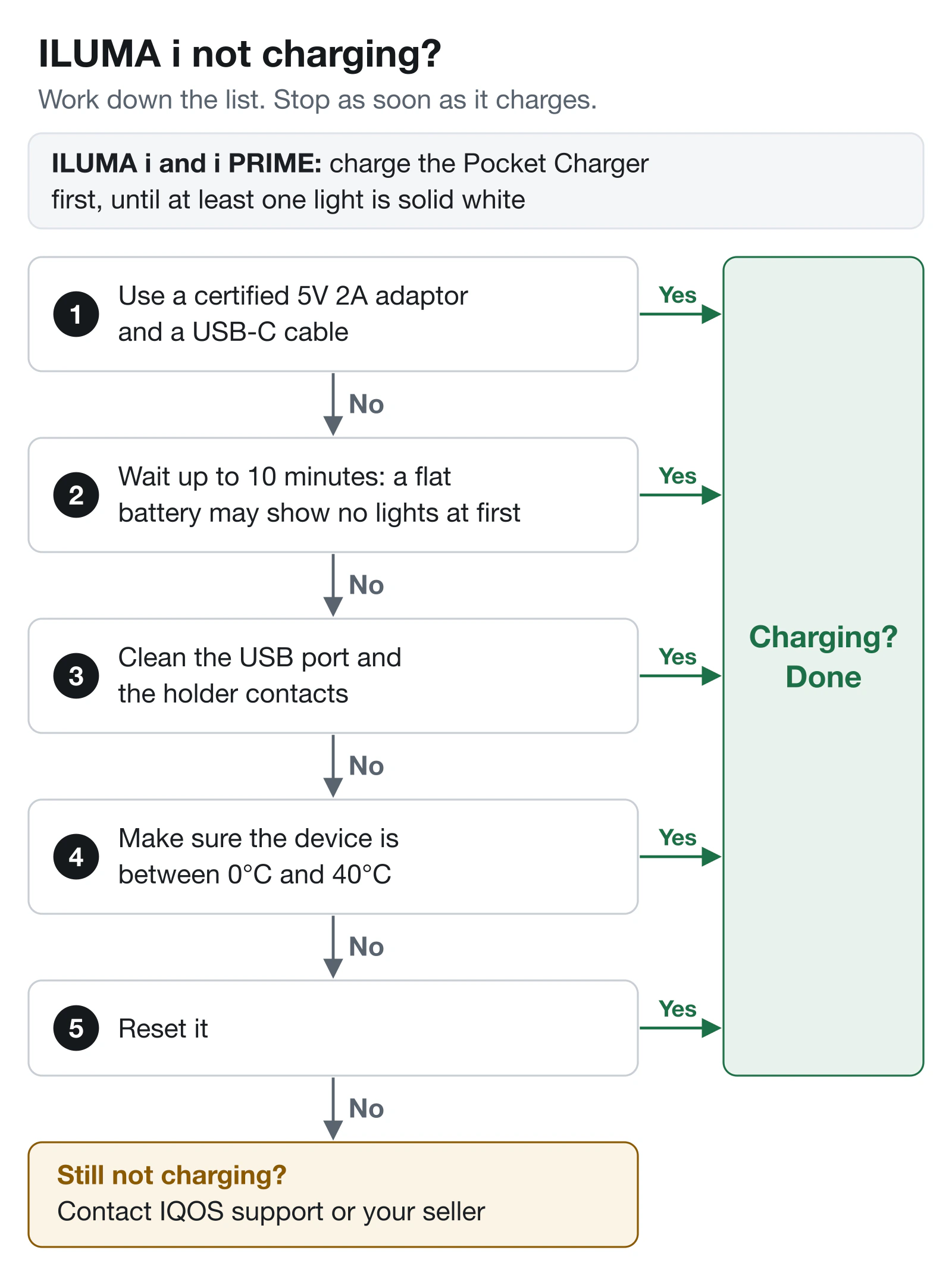
If your IQOS ILUMA i is not charging, first use a certified 5V 2A adaptor with a USB-C cable, and wait up to 10 minutes, because a fully flat battery may show no lights at first. Then clean the USB port and the holder contacts, and make sure the device is between 0°C and 40°C. If it still will not charge, reset it. If that fails, contact IQOS support or your seller.
Which part is not charging?
- IQOS ILUMA i ONE: one device, charged straight from the wall with a USB-C cable.
- IQOS ILUMA i and ILUMA i PRIME: two parts. The Pocket Charger charges from the wall, and the holder charges inside the Pocket Charger.
On the two-piece kits, check the Pocket Charger first. IQOS UAE says it needs at least one solid white light before it can charge the holder. A holder will not charge from a flat Pocket Charger. Not sure which kit you have? See our comparison of the three ILUMA i models.
What adaptor and cable should you use?
IQOS asks for a certified adaptor with a 5V 2A (10W) output, used with the IQOS USB-C cable. The ILUMA i kits come with a cable, but IQOS UAE sells the adaptor separately. IQOS Malta and IQOS Egypt add these points:
- A 5V 3A adaptor is fine. The device still draws 5V 2A.
- A weaker adaptor, such as an old 1A phone plug, makes charging slower. IQOS says it can also cause poor charging or a malfunction.
- The adaptor and cable from an earlier IQOS device can be used.
- Look for a safety certification mark on the adaptor.
How long should a full charge take?
| Model | Full charge (IQOS figure) | Source |
|---|---|---|
| IQOS ILUMA i ONE | About 90 minutes | IQOS UAE first-steps and support pages |
| IQOS ILUMA i and ILUMA i PRIME | About 135 minutes (Pocket Charger) | IQOS UAE first-steps pages |
Two waits are normal:
- After a long time unused, IQOS UAE says the charging lights may take up to 10 minutes to appear.
- On the i and i PRIME, IQOS Egypt says the Pocket Charger can take up to 10 minutes to fully charge the holder the first time, or after a long rest.
On the i ONE, IQOS UAE says the 4 lights turn solid white and then switch off when it is full. Our ILUMA i lights guide explains the other colours and blinks.
How to fix an ILUMA i ONE that won't charge
- Unplug it. Check the USB-C ports on the device and cable are dry and free of dust. IQOS suggests blowing gently to clear them. Do not push anything metal into the port.
- Check the adaptor. Use a certified 5V 2A adaptor plugged into a wall socket, not a laptop or car port.
- Charge and wait. Leave it for at least 10 minutes. About 15 minutes of charging should turn the yellow light white, according to IQOS Egypt.
- Move it away from magnets. IQOS lists a nearby magnet as one cause of a blinking red light.
- Reset it. IQOS UAE says to hold the button for 10 seconds when the lights work but it will not charge. The lights fade in, blink twice fast and then show the charge level. Our reset guide also lists the 7-second reset for this model.
- Update the firmware in the IQOS app if a reset does not help.
How to fix an ILUMA i or ILUMA i PRIME that won't charge
- Charge the Pocket Charger from the wall with a 5V 2A adaptor until at least one light is solid white.
- Clean the contacts. Wipe the contacts between the holder and the Pocket Charger with a soft, dry cloth. Keep the USB port clear of dust.
- Seat the holder properly. Put it in the Pocket Charger and close the door or wrap. If it will not click in, see our guide to an ILUMA i holder that is stuck or won't click in.
- Wait for the holder lights. Leave it until at least one holder light on the Pocket Charger turns solid white.
- Wake the holder. Take it out and give the holder button a short press.
- Reset. With the holder inside, hold the Pocket Charger button for 10 seconds. All lights go off, blink twice and come back on.
- Check the firmware in the IQOS app.
IQOS Egypt says three blinking white lights on the Pocket Charger point to slow charging. That can come from a flat battery, a weak power source, dirty contacts or a software problem. Steps 1 to 7 cover all four.
Can UAE heat stop an ILUMA i from charging?
Yes. The IQOS ILUMA i user guide says to operate the device only between 0°C and 40°C. It also says not to use, charge or store it somewhere hot, such as inside a car in summer. IQOS Egypt adds that heat or cold can slow charging.
A device left in a parked car, or charged in direct sun, can pass that range. Bring it indoors and let it cool before you plug it in. Let it cool naturally, as IQOS also warns against excessive cold and moisture. Our guide to storing TEREA in UAE heat covers safe spots for packs and devices. If the device has also been wet or sandy, follow our steps for an ILUMA i exposed to water, sand or heat before charging.
What if the battery is just worn out?
On the ILUMA i and i PRIME, IQOS UAE gives a clear sign: one or two lines on the Touch Screen blink 8 times. It calls this battery end of life, with one or both uses lost for good.
IQOS UAE adds that 8 blinks after 12 months from purchase are normal battery wear. Before 12 months, it suggests a replacement eligibility check. Battery wear is not something a reset can repair. Our guide to the IQOS ILUMA i warranty in the UAE covers how to make a claim.
A worn battery is also one reason an ILUMA i stops mid-session.
For the i ONE, IQOS does not publish a battery-wear light pattern. If it charges fully but runs down far sooner than its usual uses per charge, contact IQOS support.
When should you contact IQOS or us?
Contact IQOS support if the device:
- shows no lights after 10 minutes on a known-good adaptor and cable,
- has visible damage, overheats, or the battery appears to be leaking, or
- still will not charge after a reset and a firmware update.
The ILUMA i user guide says not to charge a device that is damaged or broken.
If you bought it from us and it was faulty on arrival: Faulty, damaged or dead-on-arrival items must be reported within 24 hours. We collect them free. We have no separate store warranty. A device that is faulty on delivery is replaced or refunded if you tell us within 24 hours; after that the manufacturer's warranty terms apply. Read our refund policy, or contact us with your order number.
FAQ
Why is my IQOS ILUMA i holder not charging in the Pocket Charger?
The Pocket Charger may be flat, the contacts may be dirty, or the holder may not be seated. Charge the Pocket Charger until it shows at least one solid white light. Then wipe the contacts and reseat the holder, and wait for at least one holder light to turn solid white.
Can I charge an ILUMA i with my phone charger?
Yes, if it is a certified adaptor with a 5V 2A output or higher, used with a USB-C cable. IQOS says a lower-power adaptor charges more slowly and may not charge properly.
My ILUMA i ONE shows no lights at all when plugged in. Is it dead?
Not always. IQOS UAE says a fully flat battery may take up to 10 minutes to show lights. Leave it plugged into a 5V 2A adaptor for that long before you try a reset.
Sources
- IQOS UAE: Troubleshooting ILUMA i ONE, ILUMA i and ILUMA i PRIME
- IQOS UAE: How to use and charge IQOS ILUMA i, ILUMA i PRIME and ILUMA i ONE (135- and 90-minute charge)
- IQOS UAE: What to do if I cannot start the experience (ILUMA i ONE) (90-minute charge)
- IQOS UAE: What to do if I did not use my ILUMA i device for a long time
- IQOS UAE: What to do if there is no 2nd consecutive experience available (battery wear)
- IQOS UK: IQOS ILUMA i user guide (PDF) and Troubleshooting IQOS ILUMA i
- IQOS Egypt: How to charge IQOS ILUMA i PRIME and Meaning of IQOS ILUMA i ONE lights
- IQOS Malta: About IQOS ILUMA i (adaptor power)
How we check these facts is set out in our editorial standards.
More guides
More troubleshooting guides · TEREA Silver information hub
Other guides
How to Reset an IQOS ILUMA i ONE, ILUMA i or ILUMA i PRIME
How to reset an ILUMA i ONE, ILUMA i or ILUMA i PRIME that will not heat, respond or charge, with button timings and light patterns from IQOS UAE.
How to Check Your ILUMA i Kit and TEREA Silver Are Genuine
Practical checks for an ILUMA i kit and TEREA Silver packs, before and after you buy in the UAE: serial number, IQOS registration, warranty and the FTA tax stamp.
IQOS ILUMA i Lights Explained: What Each Colour and Blink Means (ILUMA i ONE, i and i PRIME)
A model-by-model key to IQOS ILUMA i lights and Touch Screen signs, from IQOS UAE support pages: what red, yellow and white blinks mean, and what to do next.
How to Store TEREA in UAE Heat, and Handle It Safely
Where to keep TEREA packs and cartons in the UAE summer, and the handling warnings IQOS gives about the metal part inside every stick.